
ANALYTICS
Post-Webinar Survey Questions: A Copyable Template for B2B Events
Post-webinar survey questions help a B2B team understand what attendees found relevant, what remains unclear, and what support would help next. Start with five core questions covering relevance, confidence in a specific task, an unresolved…
Post-webinar survey questions help a B2B team understand what attendees found relevant, what remains unclear, and what support would help next. Start with five core questions covering relevance, confidence in a specific task, an unresolved question, difficulty following the session, and a useful next resource. Use the answers to choose a concrete change to the next webinar or its follow-up.
A post-webinar survey is a short feedback form for people who watched the session live or on replay. The template below gives you complete questions and response options. You can adapt it for an educational webinar, a product demo, or customer training without sending every attendee a long question bank.
Copy This Five-Question Post-Webinar Survey
Use this as a starting template for an educational B2B webinar. Replace [webinar title], [topic], and [specific task] before sharing it. The task should be something the session actually explained, such as creating a webinar run of show or evaluating a product workflow.
Suggested form introduction:
“Please answer about [webinar title]. Your feedback will help us improve the session and decide which resources to create next. You can skip any question.”
Add an accurate notice explaining how your team uses and stores responses. If the form identifies respondents or connects answers to webinar records, make that clear before they submit.
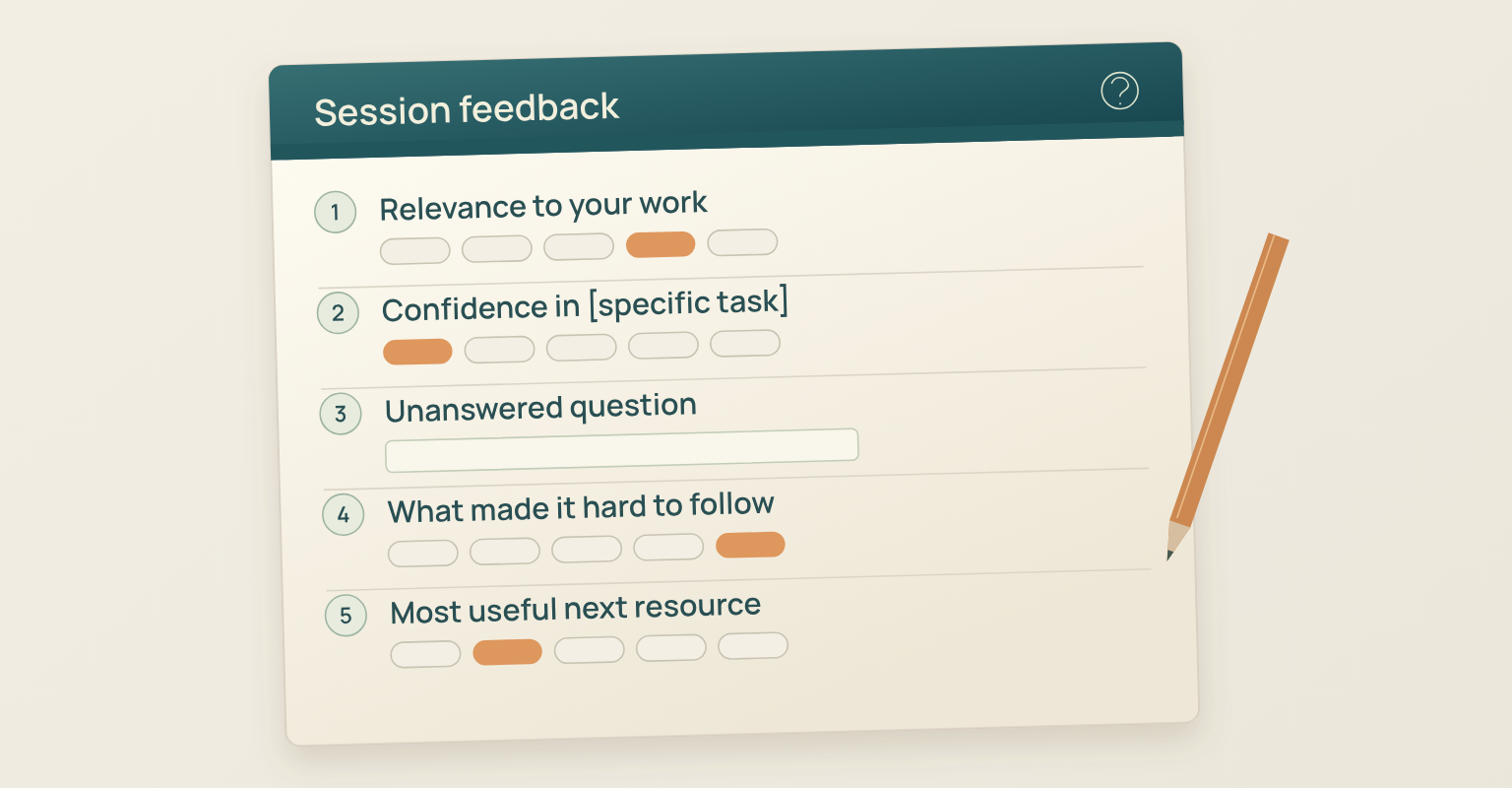
1. How relevant was this session to the work you do?
Options, choose one: Not at all relevant; Slightly relevant; Moderately relevant; Very relevant; Extremely relevant; I did not watch enough to answer.
2. After this session, how confident are you that you could [specific task]?
Options, choose one: Not at all confident; Slightly confident; Moderately confident; Very confident; Extremely confident; This task is not relevant to my work; I did not see this part of the session.
3. What question about [topic] is still unanswered for you?
Response: Optional short text. Allow an empty answer. Do not require someone to invent a problem to finish the survey.
4. What, if anything, made the session difficult to follow?
Options, choose the main issue: Nothing made it difficult; Audio was hard to hear; Shared text or visuals were hard to read; Captions were missing or difficult to use; I had trouble accessing the session; Something else, please specify.
5. Which resource about [topic], if any, would be most useful next?
Options, choose one: A worked example; A checklist or worksheet; A deeper walkthrough; A related webinar; I do not need another resource; Something else, please specify.
The second question measures reported confidence after the session. It does not establish how much confidence changed or whether someone can complete the task correctly. If you need evidence of learning or adoption, use an appropriate task check or later behavior alongside the feedback.
Keep contact requests separate from these five feedback questions. An optional follow-up field can ask, “Would you like a reply about your feedback?” with Yes and No options and no preselected answer. If someone chooses Yes, ask for the contact details needed to respond and what they want help with. Treat that as a request about their feedback, not permission for unrelated sales outreach.
Choose Questions for a Decision Your Team Can Make
Before building the form, finish this sentence: “We will use these answers to decide whether to change _____.” A useful answer names something the team controls, such as the depth of an example, the training resource, or the way questions are handled.
For a first session, the five-question template is a reasonable starting point. For a recurring webinar, keep the core questions stable and replace only the question needed to investigate a new issue. Do not add a question because its answer would be interesting if nobody can use it.
| Decision | Question to Prioritize | Likely Owner |
|---|---|---|
| Make the content more relevant to a specific role | Relevance to work | Webinar program owner |
| Explain a workflow more clearly | Confidence in the specific task and unresolved questions | Presenter or subject expert |
| Remove a delivery barrier | Main difficulty following the session | Webinar producer |
| Choose the next supporting asset | Most useful next resource | Content or customer education owner |
AAPOR's survey research guidance recommends defining the research objective and considering whether a survey needs other evidence alongside it. Applied to webinars, this means using a feedback form for questions attendees can answer about their experience, then checking operational facts in the webinar report.
Adapt the Template for Product Demos and Customer Training
Keep the relevance and delivery questions where they serve the session. Replace the task, unresolved-question, and resource prompts to match the webinar's purpose. The alternatives below are replacements, not extra questions to append to every form.
Product Demo Survey Questions
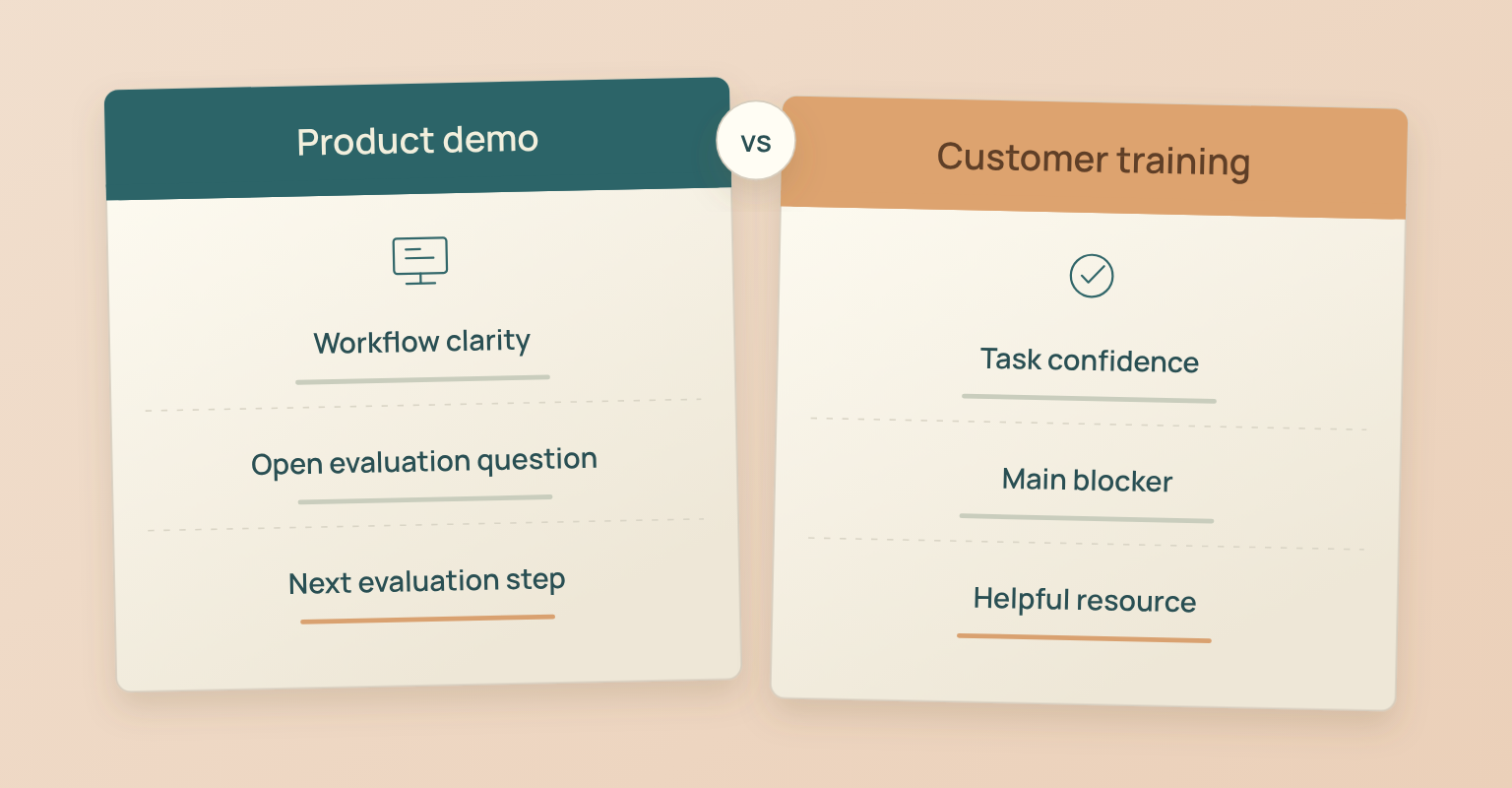
A product demo should help someone understand a workflow and identify what they still need to evaluate. Replace questions two, three, and five with:
1. How clear is the process for [demonstrated workflow] after this demo?
Options, choose one: Not at all clear; Slightly clear; Moderately clear; Very clear; Extremely clear; I did not see this part of the demo.
2. What do you still need to understand before evaluating [product] for your situation?
Response: Optional short text. This can reveal a question about a workflow, integration, security requirement, or implementation constraint without assuming the respondent is ready to buy.
3. Which next step, if any, would help you evaluate [product]?
Options, choose one: Review a workflow example; Read integration documentation; Read security documentation; Request a walkthrough for my situation; No next step for now; Something else, please specify.
If someone requests a walkthrough, provide a clearly labeled way to make that request and leave contact details. A high clarity rating alone should not trigger a sales handoff. Review actual requests and account context through your lead qualification framework.
Customer Training Survey Questions
Customer training should focus on the task a participant needs to perform. Replace questions two, three, and five with:
1. How confident are you that you could complete [specific product task] on your own?
Options, choose one: Not at all confident; Slightly confident; Moderately confident; Very confident; Extremely confident; This task is not part of my role; I did not see this part of the training.
2. What is the main thing that would stop you from completing [specific task]?
Options, choose one: Nothing would stop me; I do not have the required access; The steps are still unclear; I need more practice; This task is not part of my role; Something else, please specify.
3. Which resource, if any, would help you use this workflow?
Options, choose one: A step-by-step guide; A short example recording; A practice exercise; A session where I can ask questions; I do not need another resource; Something else, please specify.
These questions tell the education team where help may be needed. Confirm actual completion or product use in the relevant system if that is the objective of the training.
Write Neutral Questions With Clear Response Options
Ask about one idea at a time. “How good were the speaker and the audio?” combines two things that may receive different answers. If audio quality is the decision, ask about audio. If delivery clarity is the decision, ask about how easy the explanation was to follow.
Avoid praise inside the question. “How valuable was our excellent session?” nudges the respondent before they answer. “How relevant was this session to the work you do?” leaves room for a low rating. Pew Research Center's guidance on writing survey questions explains why wording, response choices, question order, and pretesting matter.
When setting up the form:
- Label every point on a rating scale and keep the labels in a logical order.
- State whether a respondent should choose one answer or several. The templates here use single-choice questions.
- Offer a suitable way to say that a task does not apply, an issue did not occur, or the person cannot judge.
- Leave open comments optional and use them to discover what the closed options missed.
The example scales are editorial starting points, not validated assessment instruments. If you compare recurring sessions, keep the question wording, response labels, and collection context consistent. Record a version change when you alter them so the team can interpret comparisons properly.
Send the Right Form to Attendees and Replay Viewers
Decide who is eligible to answer before distributing the link. People who watched live can comment on the live experience. Replay viewers can comment on the recording they saw. Registrants who watched neither need different questions.
As a starting workflow, show the survey URL or QR code on the closing slide and send the link to attendees later that day or the next business day through a follow-up channel your team controls. Keep promised resources available without making feedback a condition of access. Test the form first if you want to state an estimated completion time.
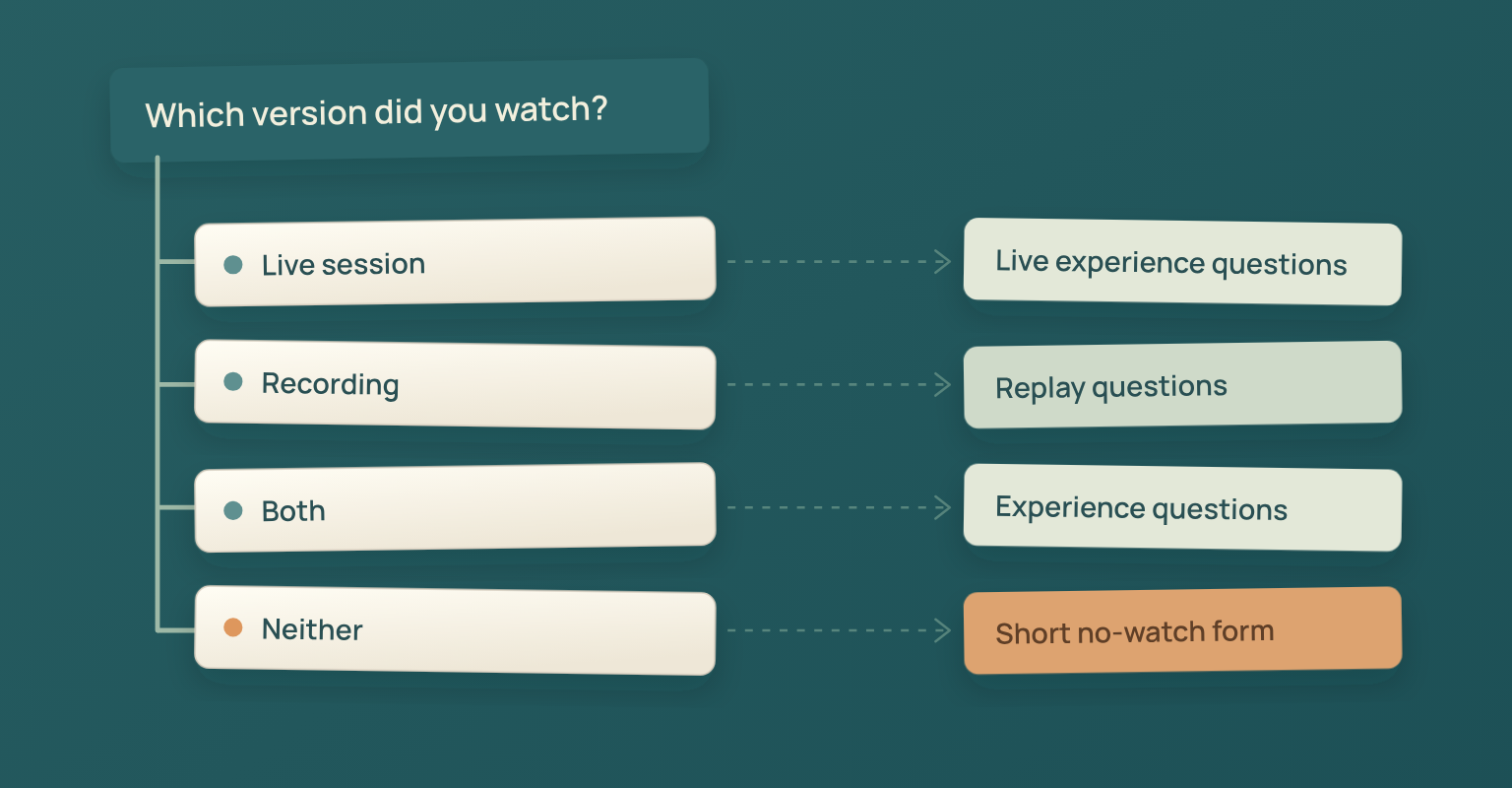
For replay viewers, offer the form after they have had a chance to watch. Change “session” to “recording” where needed and remove options about interactions that were only available live. If a shared form serves both groups, add a routing question such as “Which version did you watch?” with Live session, Recording, Both, and Neither options. Route Neither away from experience questions.
One reminder to people who have not responded may be enough for a routine session. For an initial process, choose a closing point such as five business days after the live event, then review whether that window suits your audience and replay schedule. These are workflow recommendations, not universal rules about the best response time.
For the wider attendee and no-show communication sequence, use the webinar invitation and follow-up email templates. Keep survey collection focused on feedback rather than creating another promotion sequence.
Use a Separate Short Form for People Who Did Not Watch
First check whether a registrant has watched the replay since missing the live session. Where viewing status is unknown, ask before showing the relevant questions. Someone who watched the recording can use the replay path.
For people who watched neither, two questions can help the team investigate access or scheduling:
1. What was the main reason you did not watch [webinar title]?
Options, choose one: The live time did not work for me; I forgot about the session; I had an access problem; The topic was no longer a priority; I have not had time to watch yet; Something else, please specify; Prefer not to answer.
2. What would make it easier for you to use this content?
Options, choose one: A link to the recording; A short written summary; A shorter recorded explanation; Another live session at a different time; I do not need this content; Something else, please specify.
Keep these answers separate from ratings of content or delivery. They describe barriers to watching, not an evaluation of a webinar the person did not see.
Make the Feedback Form Easy to Complete
Build the form as carefully as the questions. Test it on a phone, on a desktop, and with keyboard navigation. Check that question labels are associated with their fields, instructions are understandable, response groups make sense, and errors tell the respondent how to continue. A long rating grid is often harder to review on a small screen than separate questions.
The W3C Web Accessibility Initiative's Forms Tutorial, updated in 2026, covers labels, grouping, instructions, validation, and notifications. Use that guidance when choosing or configuring a form tool. Avoid an unnecessary countdown or short completion limit; let respondents answer at their own pace.
Ask only for information needed to improve the webinar or handle a requested reply. Do not require company size, phone number, and buying timeframe to submit routine session feedback. If named responses will be linked to event records, explain that use. If you describe feedback as anonymous, check the form's identity and tracking settings before making that promise.
Turn Survey Findings Into Changes With an Owner
Review the answers with the people who can change the webinar. Keep one record of the question wording, survey version, audience, collection window, and number answering each question. Separate live feedback, replay feedback, and comments from people who did not watch.
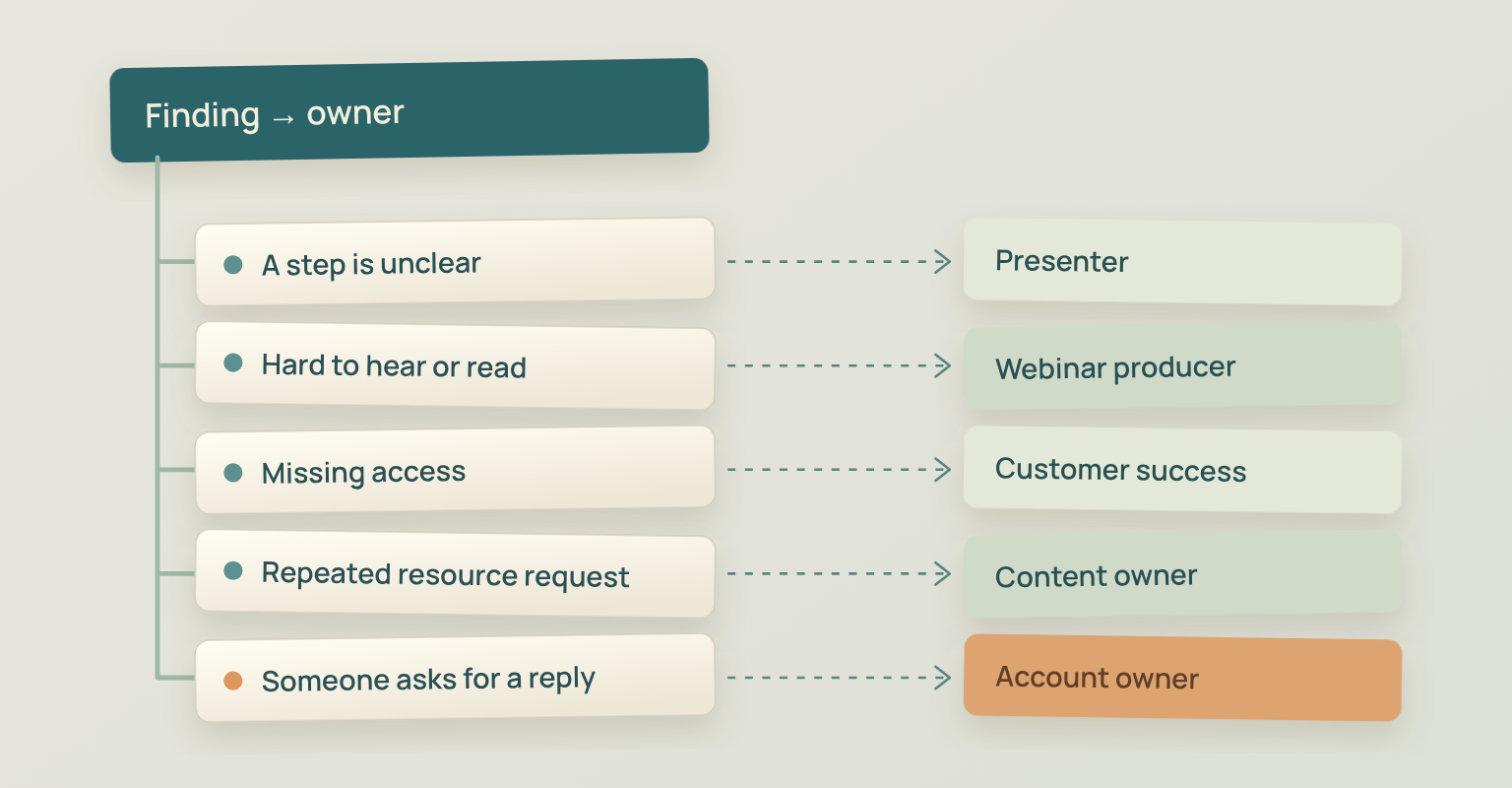
Turn repeated comments into an issue the team can investigate. If several respondents say the examples were difficult to follow, review the relevant section of the recording and any related questions from the event. A single report of a serious access barrier can also deserve investigation; it does not need to become the most common answer before someone checks it.
| Finding | Owner | Next Action |
|---|---|---|
| A demonstrated step is repeatedly described as unclear | Presenter or subject expert | Add a worked example and check it with a suitable reader |
| Respondents report trouble hearing or reading shared content | Webinar producer | Review the recording and adjust the next rehearsal |
| Training respondents say they lack access | Customer success owner | Investigate permissions through the normal support process |
| A specific resource is repeatedly requested | Content or education owner | Decide whether to create it and set a delivery date |
| Someone explicitly requests a conversation | Relevant account or support owner | Review the request and arrange the appropriate reply |
For example, imagine 36 respondents answer the task-confidence question and 18 choose “Not at all confident” or “Slightly confident.” Report that result about those 36 respondents, then investigate the explanation and create the support they need. It does not establish that half of all attendees failed to learn.
AAPOR's Standard Definitions explains why response rate alone cannot establish the amount of nonresponse error. Use the event marketing metrics guide for reporting definitions and the broader measurement plan. For this form, preserve the response context and make the next decision explicit.
Before the next session, record what changed and what evidence the team will review afterward. When you can report a useful change back to respondents, do so through an appropriate communication channel. That closes the work the survey started.
Use JakoMeet Webinar Evidence to Give Feedback Context
JakoMeet Webinar Analytics brings together registrations, live attendance, no-shows, supported registration-source comparisons, questions and poll results, plus replay views where available. Those records can help the team investigate feedback about a session and distinguish operational activity from what respondents said.
Build the post-webinar form in the survey tool your team chooses and review its answers alongside the event report. This workflow uses separately collected survey responses; it does not depend on native survey collection or an automatic sync. Match named answers to event records only where the form's stated data use supports that connection.
For the next webinar, choose the task you want attendees to understand, select the five feedback questions that serve it, and decide who will review the answers. Use the webinar report to check the relevant event evidence before changing the session.
Frequently asked questions
What Should I Do If Only a Few People Answer?
Use the responses as specific feedback to investigate, and state how many people answered each question. Avoid describing the answers as the view of the full audience. Check whether the form worked and reached the intended viewers before adding more questions or reminders.
Should a Post-Webinar Survey Be Anonymous?
Choose based on whether you need an individual reply or feedback about the session overall. If you offer anonymous feedback, verify that the form and tracking settings support it. An optional contact request lets someone ask for a reply without making contact details mandatory for everyone.
Should I Include NPS in a Webinar Survey?
Include a recommendation question only if the team has a defined use for that measure. For routine webinar improvement, relevance, task confidence, unresolved questions, and delivery barriers usually give the owner a more direct issue to work on. Do not treat a recommendation score as proof of buying intent.
Can a Post-Webinar Survey Prove That Attendees Learned Something?
Self-reported confidence can reveal where people feel they need support, but it does not prove task competence. Use a relevant exercise, task check, or later behavior when the objective requires evidence of learning or adoption.
How Many Questions Should a Post-Webinar Survey Have?
Start with the five core feedback questions in this template and remove any your team will not use. Routing and optional contact fields may add questions to the actual form. There is no single question count that guarantees useful feedback or a particular completion rate.
Sources and Further Reading
- AAPOR: Best Practices for Survey Research: Research objectives, question design, and the use of other evidence alongside a survey (opens in a new tab)
- Pew Research Center: Writing Survey Questions: Wording, response choices, question order, and pretesting (opens in a new tab)
- W3C WAI: Forms Tutorial: Current 2026 update on form labels, grouping, instructions, validation, and user notifications (opens in a new tab)
- AAPOR: Standard Definitions: The limits of interpreting response rate as evidence about nonresponse error (opens in a new tab)