
EVENT STRATEGY
Webinar Planning Checklist: From Idea to Results
Plan a B2B webinar from the first audience decision to the final report, with a practical checklist covering registration, promotion, live delivery, follow-up, and measurement.
Teams often choose a webinar topic before defining the audience outcome, publish a registration page before deciding how the data will be used, or rehearse slides without rehearsing speaker handoffs. By the time the session begins, those weaknesses are already built into the campaign.
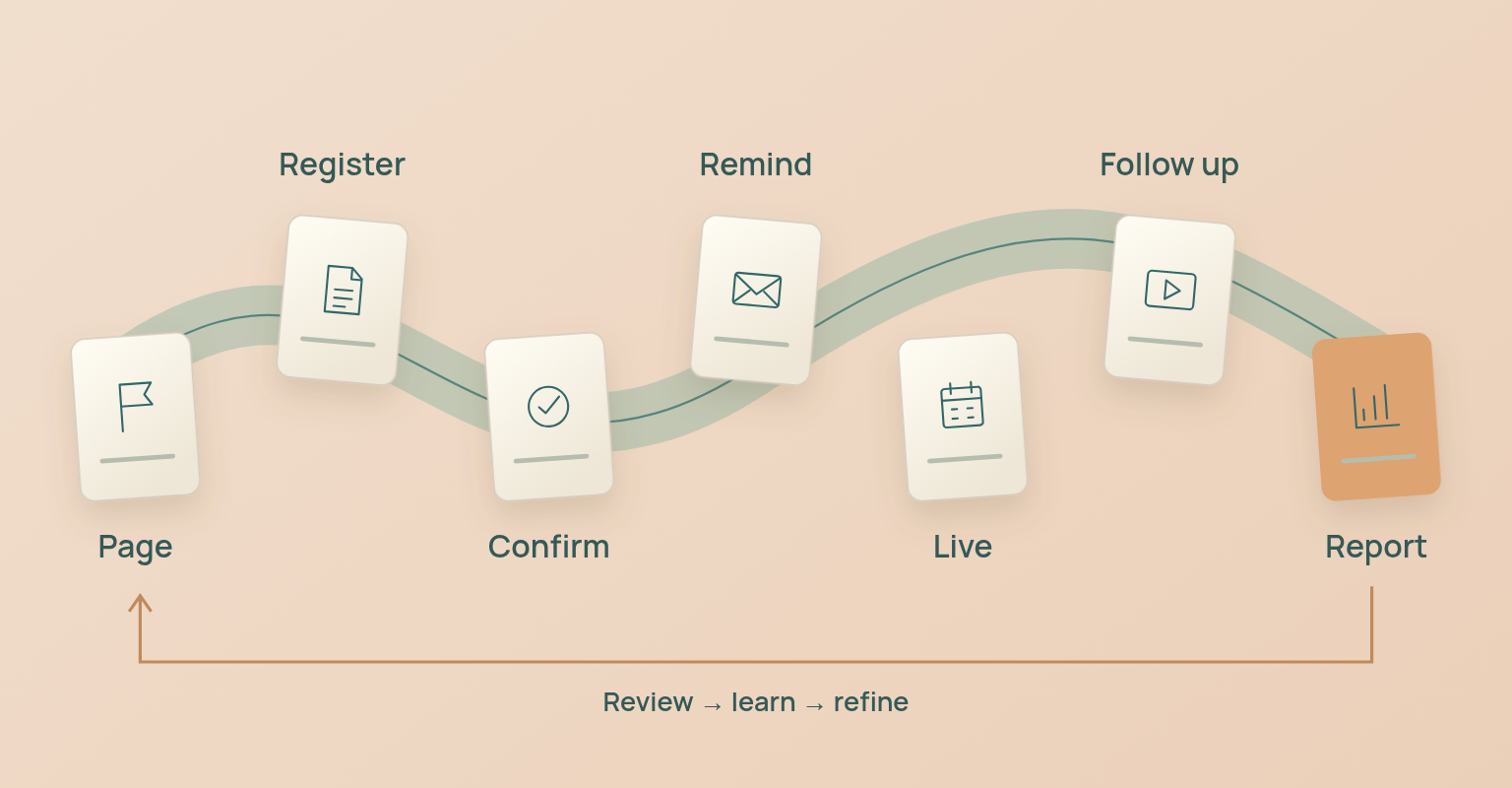
A webinar planning checklist is an operational sequence for coordinating strategy, registration, promotion, live delivery, follow-up and reporting. To plan a webinar well, define one audience outcome and one campaign owner, build and test the registration path, prepare the communication sequence, create a timed run of show, rehearse access and handoffs, plan the replay and follow-up, and agree on the metrics before the event.
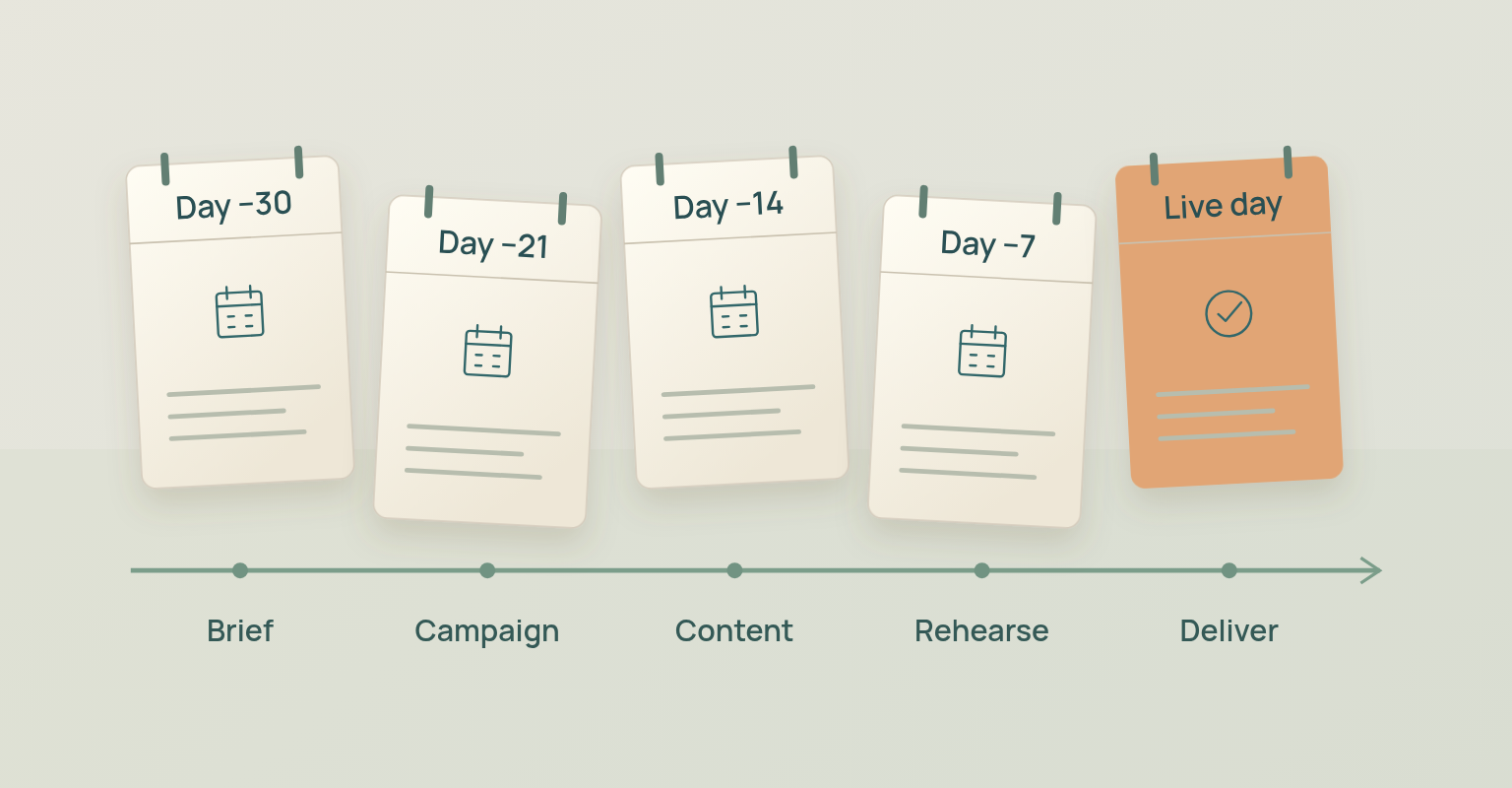
This guide is for focused B2B webinars run by marketing, product marketing, customer education or enablement teams. It uses a 30-day operating schedule; partner events, regulated programmes and multi-session series may need more time.
Webinar Planning Checklist at a Glance
- Define one audience outcome.
- Assign one campaign owner.
- Build and test the registration path.
- Prepare invitation, confirmation and reminder messages.
- Build a timed run of show.
- Rehearse speaker access, handoffs and recovery plans.
- Write attendee and no-show follow-up.
- Decide how replay access will work.
- Define the metrics and owners before the event.
Use the checklist in order. Later tasks depend on earlier decisions.
Create a One Page Webinar Brief Before You Start
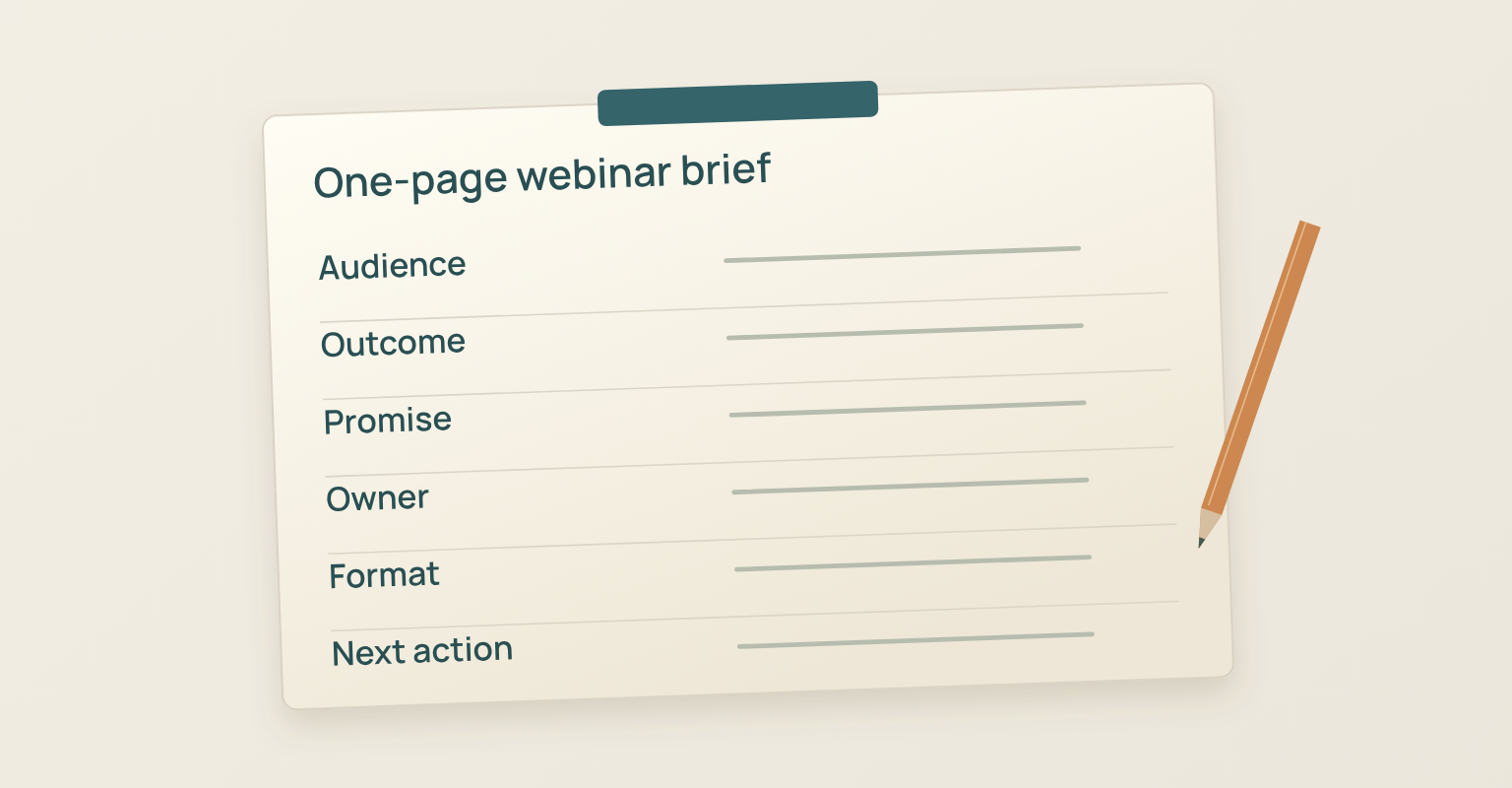
Do not begin with slides. Begin with a short campaign brief that the host, speakers, producer and follow-up owner can all understand. The brief should answer nine questions:
- Who is the primary audience?
- What problem are they trying to solve?
- What should they understand, decide or be able to do after the session?
- What clear promise will the registration page make?
- What evidence, demonstration or expertise will support that promise?
- What format best serves the outcome?
- What is the primary next action after the webinar?
- Which metric will answer the main business question?
- Who owns the campaign from creation through reporting?
A useful attendee outcome is specific enough to shape the agenda. "Learn about our product" is not specific. "Choose the right launch format for a new feature and leave with a four-week campaign plan" is specific enough to guide the title, examples, demo and follow-up.
The business outcome and the attendee outcome are related, but they are not the same. Your business may want qualified conversations. The attendee still needs a reason to spend 45 minutes with you. Plan the attendee value first, then decide how the business next step fits naturally.
Complete Webinar Planning Checklist
1. Set the Outcome Before Choosing the Title
A webinar needs one primary job. It may create demand, support a product launch, teach customers, prepare employees or start a partner conversation. It should not try to do all of these at once. Write the outcome as a change in the attendee: "After this session, the attendee can…"
- Compare two approaches and choose one
- Complete a specific task
- Explain a new process to a colleague
- Recognise the signs of a common problem
- Build a simple plan using the framework presented
- Decide whether the product or approach fits their situation
Then write the main business question: Did the topic attract the intended audience? Which promotion source produced the most relevant registrations? Did registrants become live attendees? Which questions appeared repeatedly? Did the replay extend the life of the session? Did the event create the next conversations we intended?
This distinction prevents a common reporting mistake. Registrations may show that the topic and promotion worked. They do not prove that the live session worked, or that the campaign created revenue.
Checklist for This Step
- One attendee outcome is written in a single sentence
- One primary business question is defined
- One primary next action is selected
- The topic, title and agenda all support the same outcome
2. Define the Audience and the Registration Promise
"B2B marketers" is usually too broad to guide a useful webinar. Narrow the audience by role, situation and need: "Product marketers at B2B software companies who are preparing a feature launch and need a repeatable live campaign plan." That definition improves the title, examples, speakers, registration fields, promotion channels and follow-up, and it makes it easier to decide who the webinar is not for.
The registration page should answer four questions quickly: What will I learn or be able to do? Why is this relevant to me now? Who will help me understand it? What happens after I register? The headline should promise an outcome, not merely label a subject.
Weak: "2026 Product Update Webinar"
Stronger: "How to Launch a New Feature Without Losing the Story"
Ask only for registration information that has a clear job. The European Commission's GDPR principles describe data minimisation as collecting and processing only the personal data needed for a defined purpose. Nielsen Norman Group's EAS framework reaches a similar conclusion from a usability perspective: eliminate unnecessary questions first, automate what can be automated, then simplify what remains. For many B2B webinars, name, business email, country, job title, industry and company are enough. If the team cannot explain how a field will change the event experience, routing, reporting or lawful follow-up, remove it.
You can build a webinar registration page and form in JakoMeet, choose an available page structure, add branding and event content, configure registration fields and consent, then preview the page before publishing. For a section-by-section breakdown, use the webinar landing page guide.
Checklist for This Step
- The primary audience includes role, context and need
- The page makes one clear outcome promise, and the speaker and agenda support it
- Every form field has a defined purpose
- Consent and privacy language have been reviewed for the relevant market
- The thank-you and access experience are defined
This section is operational guidance, not legal advice. Contact and consent requirements vary by jurisdiction, audience and communication type.
3. Choose the Format, Length, Date, and Owners
Choose the format based on the work the audience needs to do. Use a focused briefing when one clear point matters most, an interview when the audience needs practical judgement from an expert, and a panel when contrasting perspectives will help people decide. Use a product demonstration when the audience needs to see a workflow, a workshop when participants need guided practice, and a question session when they already understand the subject and need direct access to expertise.
Do not default to 60 minutes because that is familiar. Use the shortest format that can deliver the promised outcome without rushing: 30 minutes for a focused briefing or update, 45 minutes for teaching, one example and audience questions, 60 minutes for multiple speakers, a detailed demonstration or a wider discussion.
The right date and time depend on the audience. Check time zones, work patterns, holidays, major industry events and internal conflicts. Display the time zone clearly on the page and in every message, and make calendar addition part of the registration experience.
Assign named owners before production begins. One person may hold more than one role, but each responsibility still needs an owner. The campaign owner controls the brief, timeline and decisions; the host opens, guides and closes the session; the producer manages the live environment, speakers and transitions; the moderator handles chat or questions. Speakers own their assigned sections and examples, while the promotion, follow-up and reporting owners manage audience communication, post-event actions and the final review.
Checklist for This Step
- The format supports the attendee outcome and the duration follows the content, not habit
- Date, time and time zone fit the audience
- Every operational role has a named owner
- The primary CTA has an owner after the session
4. Build the Full Campaign Path Before Promotion Starts
Promotion should not begin until the full registration and attendance path works from beginning to end: event page, registration, confirmation, calendar entry, reminders, access, live session, replay, follow-up and reporting. Test the journey as a registrant, not only as an organiser. Confirm that the page explains the value, the form works on mobile, the confirmation sets expectations, the calendar entry uses the correct time zone, the access path is clear and the sender identity is recognisable. You can send webinar confirmations, reminders and follow-up in JakoMeet, keeping each message connected to the event and to the person's place in the journey.
Decide how the audience will be built: owned contacts, organic social and employee distribution, speaker distribution, partner or customer distribution, paid promotion, relevant communities, and Audience Boost for eligible campaigns that need reach beyond their own list. Track registration source from the beginning. If source information is added after promotion starts, early registrations may be impossible to classify accurately.
Checklist for This Step
- The entire registration and access path has been tested
- Confirmation and calendar details are correct
- Reminder and start messages are prepared
- Promotion sources are named and registration source tracking is active
- Replay access and follow-up routes are defined
5. Plan a Promotion Sequence, Not a Single Announcement
A single announcement asks one message to do too much, so plan a four-week sequence with a distinct purpose at each stage. In week 4, publish the page and send the first invitation, leading with the audience problem and promised outcome. In week 3, activate speakers, partners and employees with prepared copy. In week 2, share a specific idea, question or example from the session instead of repeating the original announcement. In week 1, send the final acquisition message to people who have not registered, while shifting registered contacts to attendance-focused communication. For channel sequencing and message roles, use the four-week webinar promotion plan.
Once someone registers, the campaign job changes. They no longer need to be convinced to fill out the form; they need context, confidence and a simple way to join. If your owned list is small, do not compensate by emailing everyone. Improve audience fit, use partners, involve speakers and consider channels designed to extend relevant reach. Eligible organisers can reach relevant professionals beyond their owned list with Audience Boost. JakoMeet handles the invitations, and only people who register enter the event audience.
Checklist for This Step
- Each promotion message has a distinct job
- Speaker and partner distribution is prepared in advance
- Registrants stop receiving irrelevant acquisition messages where the system allows it
- Reminder timing is based on the event and audience
- The source of every promotion route can be reported
6. Design the Live Session Before Creating Slides
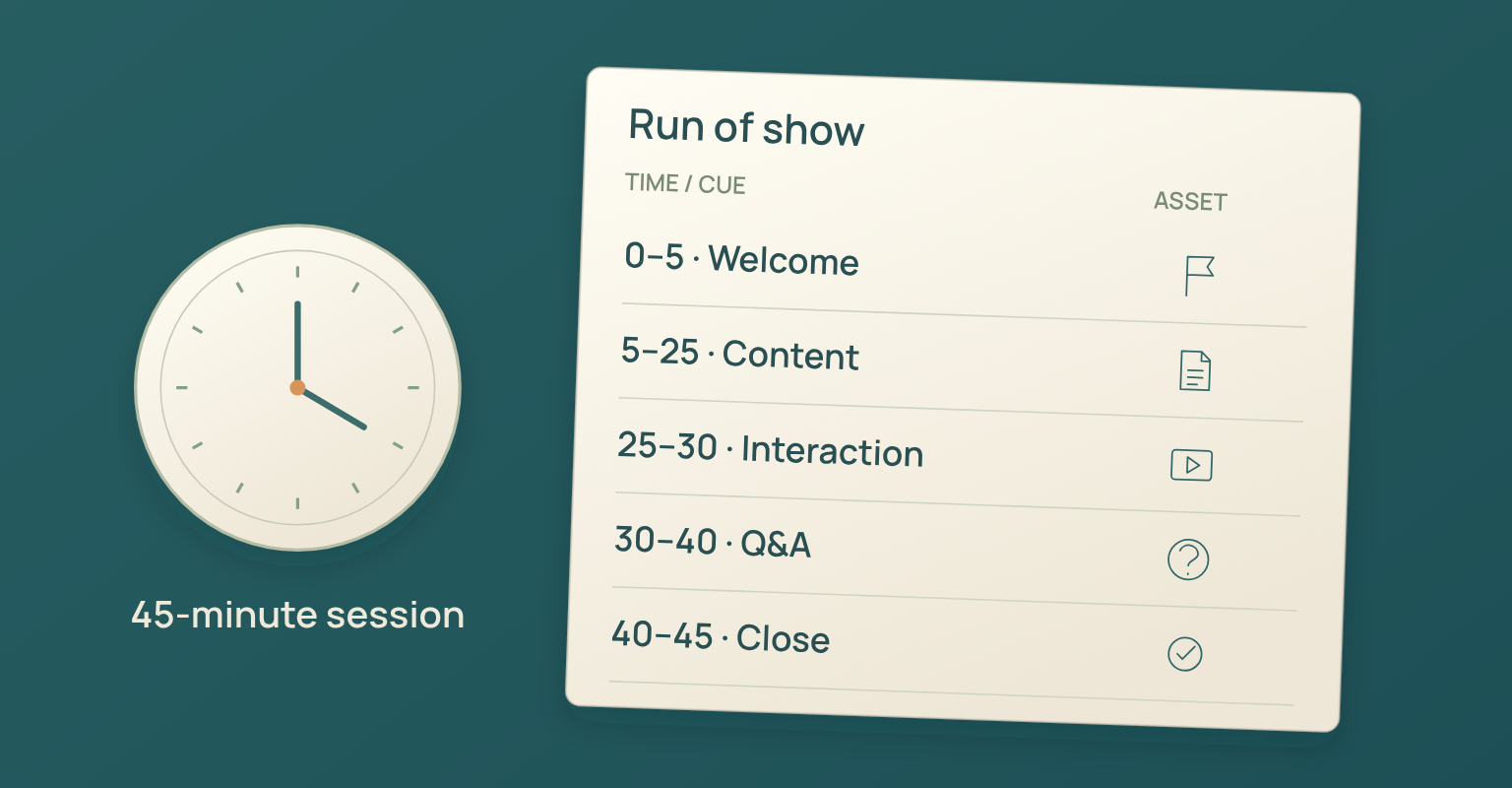
Slides are an output of the session design, not the session design itself. Build a timed run of show first. A 45-minute teaching webinar might look like this:
- 00:00 Welcome, audience context and what the session will deliver
- 00:03 Problem definition and why it matters now
- 00:08 Core framework or argument
- 00:20 Example, case or product demonstration
- 00:33 Audience question, poll or moderated discussion
- 00:40 Summary and next action
- 00:45 Close
The exact timing will change, but the structure forces useful questions: when does the audience receive value, when does the format change, where can a speaker run long, who decides which questions to surface, what must be removed if time is lost, and how will the closing return to the original promise?
Use interaction to improve understanding rather than create activity for its own sake. A poll can establish a baseline, select which branch deserves more time or test whether the main idea landed. Moderated questions suit topics that need curation, prioritisation or privacy, while open chat works when shared reactions and peer exchange add value. You can run the live webinar in JakoMeet's Control Room with guest backstage access, stage layouts, screen or presentation sharing, live captions in 10 languages, chat and moderated Q&A, and live polls. The webinar host and live production guide expands this into an event-day operating plan.
Accessibility belongs in planning, not final quality assurance. W3C guidance for remote meetings recommends considering accessibility in platform selection, setup and meeting conduct, and W3C caption guidance explains that useful captions include speech and the meaningful non-speech audio needed to understand the content. At minimum, decide how people can request accommodations, whether captions or an appropriate alternative are available, whether slides and supporting documents are accessible, whether speakers will describe important visuals, whether the audience can participate without relying on one input method, and how questions can be submitted if speaking is not possible.
Checklist for This Step
- A timed run of show exists and each speaker knows their start, end and handoff
- Interaction has a clear purpose and the moderator has a question plan
- The closing and CTA fit the promise
- Accessibility needs and platform capabilities have been reviewed
7. Rehearse Handoffs, Access, and Recovery Plans
A rehearsal should reproduce the moments most likely to fail. Ask every speaker to join through the real guest path, then check the camera, microphone, browser permissions, connection, lighting and framing. Test screen or presentation sharing from the device that will be used live. Then rehearse the transitions: host to first speaker, speaker to product demonstration, demonstration back to discussion, moderator to audience question, final answer to closing summary, closing summary to CTA.
Agree on time signals and recovery rules. The producer should know what happens if a speaker loses connection, a presentation does not load, a demonstration environment fails or the session runs five minutes behind. Prepare a simple fallback pack: the final presentation file, speaker contact details, a backup host or producer, static screenshots for critical demonstration steps, the exact closing language, guest links and access instructions, and a support route for urgent audience issues.
Guest speakers can join the JakoMeet backstage area through a dedicated link without creating an account. The link, device check and stage status should still be tested before the live date.
Checklist for This Step
- The rehearsal uses the real devices and access paths
- Screen and presentation sharing have been tested
- Handoffs and time signals are understood
- A technical fallback exists
- The final run of show is shared with everyone involved
8. Write Follow Up Messages Before the Webinar
The easiest time to design follow-up is while the promise and next action are still clear. Prepare separate messages for attendees and no-shows before the event, then use the webinar email templates when drafting the full sequence.
The attendee message thanks them for their time, restates the main takeaway, shares the replay when it is ready, provides the promised resource and offers one relevant next action. The no-show message avoids pretending they attended, explains why the session is still worth their time, shares the replay and a short summary, points to the most useful section or resource and offers a next action that does not assume live participation.
Plan the replay as part of the campaign. Contrast's 2026 webinar benchmark analysis, based on more than one million registrations, reports that 61 percent of registrants watched either live or on demand in its dataset. That is a vendor dataset, not a universal target, but it shows why replay access cannot be a last-minute decision. The webinar content repurposing guide shows how to use the replay, questions and transcript after the event.
Decide who will answer unresolved questions. If the session creates product, sales or support follow-up, assign owners before the event and define what information they need. On Growth, you can send different follow-up messages to attendees and no-shows, then review transcript, Q&A and poll themes with JakoMeet AI Insights. The system can suggest next actions for the team to review, but it does not send messages or make decisions on its own.
Checklist for This Step
- Attendee and no-show messages are drafted
- Replay access and timing are defined
- Unanswered questions have owners
- The primary CTA is ready
- Human review is required before any suggested action is used
9. Define the Report Before Collecting Data
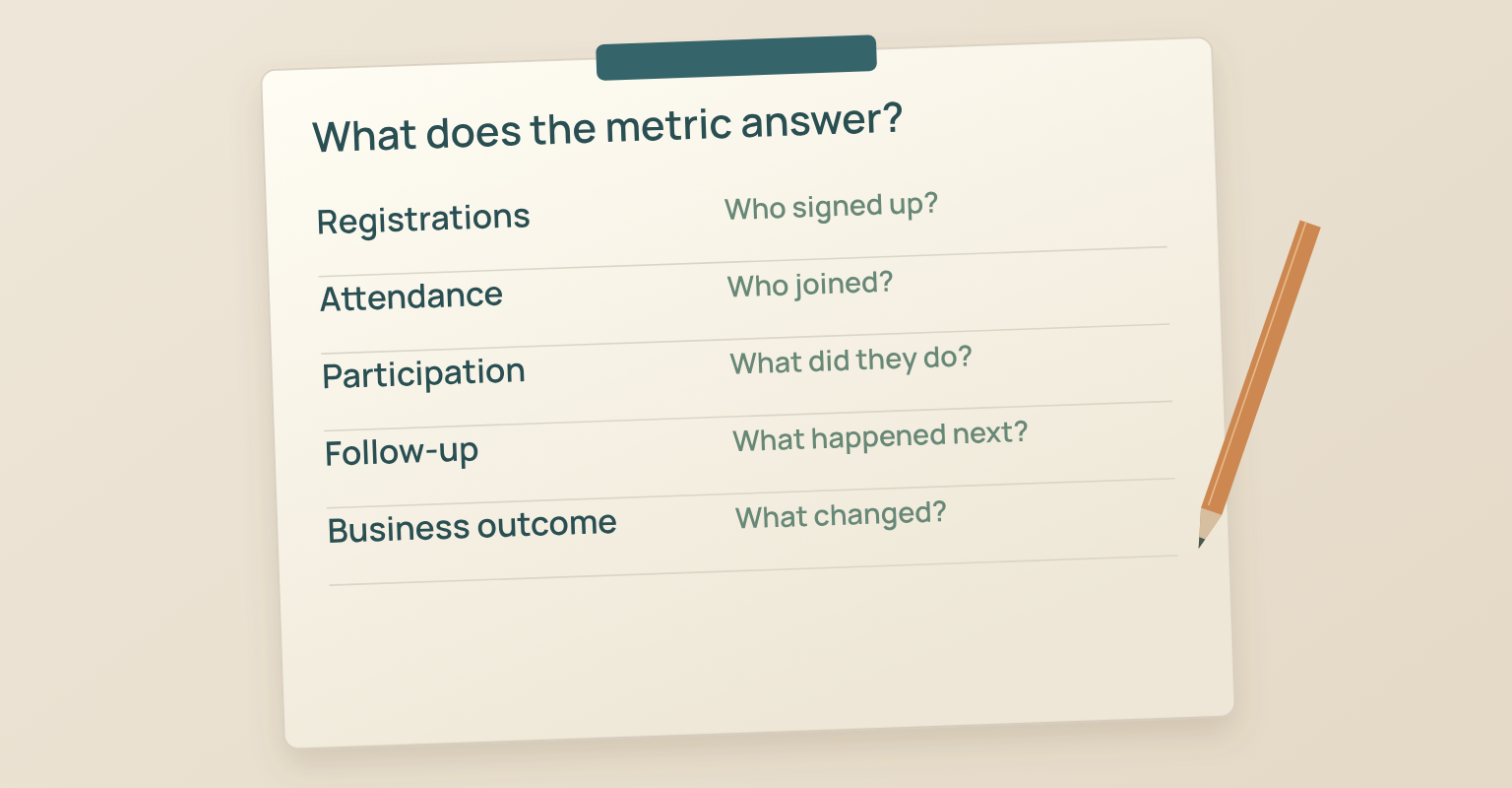
Metrics are useful when each one answers a planning question.
- Registrations: Did the promise and promotion earn interest?
- Registration source: Which route brought the audience?
- Attendees and no-shows: How many registrants joined live, and how many did not?
- Attendance rate: What proportion of registrants attended live? Divide live attendees by registrants and multiply by 100.
- Questions and poll responses: Where did the audience participate, express uncertainty or signal interest?
- Replay views: Did the session continue to reach registered viewers after the live moment?
- CTA responses: Did people take the next action the campaign asked for?
Pipeline and revenue questions usually require data from CRM and revenue systems. Do not present webinar activity as revenue attribution unless the systems and methodology support that conclusion. You can review webinar performance and engagement data in JakoMeet, including registrants, attendees, no-shows, attendance rate, supported registration sources, questions, poll results and replay views where available. AI Insights is a separate interpretation layer on Growth: start with what happened, then decide what it could mean. The event metrics guide provides the definitions, formulas and limits behind these measures.
External benchmarks provide context, but the most useful comparison is usually your own baseline. Compare webinars with similar audiences, promotion methods, formats and objectives. A customer onboarding session and a demand generation webinar should not be judged by the same success model.
Checklist for This Step
- Metric definitions are agreed before the event
- The report answers the main business question
- Registration sources can be distinguished
- Webinar activity is not confused with revenue attribution
- A review date and owner are scheduled
30 Day Webinar Planning Timeline
Days 30 to 21: Strategy and Registration
- Complete the one-page brief
- Confirm the audience, outcome and primary CTA
- Choose the format, date and time
- Assign campaign, host, producer, moderator and follow-up owners
- Confirm speakers
- Build and review the registration page
- Configure form fields, consent and thank-you experience
- Prepare confirmation and calendar details
- Define registration sources
Days 20 to 14: Promotion and Session Design
- Publish the page
- Send the first invitation
- Give speakers and partners their distribution kit
- Build the timed run of show
- Draft the content and examples
- Decide between chat and moderated Q&A
- Draft the poll if one is needed
- Define the report and metric owners
Days 13 to 7: Production and Follow Up
- Complete the presentation or demonstration plan
- Draft attendee and no-show follow-up
- Confirm replay access
- Prepare reminders and start notification
- Run the speaker rehearsal
- Test guest access, devices and sharing
- Confirm accessibility arrangements
- Prepare the fallback pack
Days 6 to 2: Final Quality Assurance
- Freeze the run of show
- Review every link and time zone
- Test registration on desktop and mobile
- Confirm speaker names, titles and pronunciation
- Finalise moderator questions
- Confirm the CTA destination
- Review attendee support instructions
- Confirm recording and replay workflow
The Day Before the Webinar
- Confirm every speaker
- Check devices, browser access and network
- Send the final reminder according to the plan
- Put the final files in one shared location
- Confirm the producer and moderator communication channel
- Recheck the registration and join experience
Webinar Day
- Open the Control Room early enough for final checks
- Bring speakers backstage and confirm status
- Check the stage, logo, names and presentation
- Confirm the moderator can see the audience channel
- Reconfirm the opening, handoffs, close and CTA
- Start and end through the agreed production owner
- Record unresolved questions and urgent follow-up needs
Within 24 Hours after the Webinar
- Confirm recording and replay status
- Send or schedule attendee follow-up
- Send or schedule no-show follow-up
- Assign unanswered questions
- Save questions, poll results and speaker notes
- Correct any access issue that affects the replay
Within Seven Days after the Webinar
- Review registration, attendance, sources and interaction
- Compare the result with the campaign question
- Capture what should change next time
- Share relevant insights with product, sales, customer success or enablement
- Turn useful questions and themes into the next content plan
- Decide whether to repeat, revise or retire the format
Common Webinar Planning Mistakes
- Starting with a title instead of an outcome. A title can sound strong and still produce an unfocused session. Define the audience change first, then use it to shape the title, agenda, examples and next action.
- Treating the registration page as an event description. A registration page should help someone decide whether the session is worth their time: a clear promise, credible speakers or evidence, and a simple next step. Collect only what the campaign needs.
- Repeating the same promotion message. A sequence should add context, proof and urgency over time. The same announcement across email, social and partner channels gives nobody a new reason to register.
- Building slides before the run of show. Build the timed session, transitions, interaction points and fallback plan first, then create the visual material that supports that structure. A rehearsal should test access, sharing, handoffs and recovery, not function as another slide review.
- Leaving follow-up, measurement and ownership until the end. Late follow-up becomes slow and generic, registrations get mistaken for business impact, and tasks fall between teams when ownership stays implicit.
How JakoMeet Supports the Webinar Workflow
JakoMeet keeps the webinar page, live session, replay and report attached to the same event, so the campaign does not need to be rebuilt at every stage. Organisers can create the event page, manage registration, prepare communications, bring guests backstage, run the session in the native Control Room and review the factual result. Growth adds broader follow-up, 100 Audience Boost credits every paid month, transcript-based AI Insights, on-demand replay registration and cross-event reporting.
See the full webinar workflow in JakoMeet, or compare JakoMeet plans and event limits.
Frequently asked questions
How Far in Advance Should You Plan a Webinar?
Four weeks is a practical working model for a focused B2B webinar with a clear topic and a small speaker group. Start earlier when the event requires partners, approvals, original research, multiple sessions, paid media, accessibility services or complex production.
How Long Should a Webinar Be?
Use the shortest duration that can deliver the promised outcome. Thirty minutes can suit a focused briefing. Forty five minutes can support teaching, an example and questions. Sixty minutes can work for several speakers or a detailed demonstration.
What Must Be Ready Before Webinar Promotion Begins?
The registration page, form, consent language, confirmation, calendar details, access expectation, source tracking and primary CTA should be defined. A registrant should be able to complete the whole path without an unfinished step.
How Many People Are Needed to Run a Webinar?
A small team can combine roles, but each responsibility still needs a named owner. At minimum, identify the campaign owner, host, live producer, speaker and follow up owner. Interactive sessions also need an audience moderator.
When Should Webinar Follow Up Be Written?
Draft attendee and no show messages before the webinar. Add final details after the session, but decide the audience logic, replay plan, resource and CTA in advance.
How Should Webinar Success Be Measured?
Start with the campaign objective. Use registrations and source data to understand reach, attendance rate to understand live conversion, questions and polls to understand participation, replay views to understand post event reach, and downstream systems to evaluate pipeline or revenue where appropriate.
Sources and Further Reading
- Contrast: 2026 Webinar Benchmarks, attendance and engagement analysis based on more than one million registrations (opens in a new tab)
- European Commission: Principles of personal data processing under the GDPR, including data minimization (opens in a new tab)
- Nielsen Norman Group: Less Effort, More Completion, the EAS framework for simplifying forms (opens in a new tab)
- W3C: Accessibility of Remote Meetings (opens in a new tab)
- W3C Web Accessibility Initiative: Captions and subtitles guidance (opens in a new tab)